
How to Stop Chasing Clients for Documents
Without Nagging or Follow-Up Emails
You’re not behind on your work. You’re just stuck waiting. Again. For clients who promised they’d send those documents “first thing tomorrow” – three weeks ago. Here’s how to break the cycle without becoming the accountant who nags.
Let’s be honest: you didn’t become an accountant to spend half your week chasing clients for documents. Yet that’s exactly where countless billable hours disappear, into the endless cycle of follow-up emails, phone calls, and “gentle reminders” that go unanswered.
If you’re tired of chasing clients for documents, you’re not alone. You’re tracking who owes you what in spreadsheets, juggling email threads from three different addresses, and watching deadlines inch closer while you wait for a response.
Meanwhile, your billable work sits untouched. Your team asks, “What should I work on?” because they can’t start until the client sends that one missing document. And you’re left wondering: Is this really what running an accounting firm has to be like?
The real cost of the document chase
Research from Dext found that accountants and bookkeepers spend nearly 5 hours per week just detecting and correcting client data errors. That’s before you factor in the time spent chasing missing documents in the first place.
Think about your own practice. If you have 100 clients and spend just 5 minutes following up with each one, that’s over 8 hours of non-billable overhead per round of requests. Multiply that across monthly bookkeeping, quarterly reviews, and annual tax returns, and you’re looking at hundreds of lost billable hours every year.
But here’s what makes this worse: you’re not losing hours to complex accounting problems or valuable advisory work. You’re losing them to admin tasks that shouldn’t require your time at all.

Why Chasing Clients for Documents Feels Never-Ending

If chasing clients for documents feels like your full-time job, you’re not alone. According to Karbon, the client chase is the single biggest blocker preventing firms from getting work done efficiently.
Why? Because the traditional approach – email, phone calls, and manual tracking – creates a perfect storm of inefficiency:
- Clients forget. Your request gets buried under 50 other emails. They meant to respond, but life happened.
- You forget. You sent a request two weeks ago. Did they respond? Did you follow up? Time to dig through email threads to find out.
- Communication is scattered. One client emails from their work address. Another texts from their mobile. A third drops files in a shared folder you check… sometimes.
- There’s no accountability. Without a clear system, clients don’t know what you need, when you need it, or what happens if they don’t send it.
The result? You spend your days playing detective, tracking down documents, sending reminders, and hoping this time will be different.
What if your clients sent documents the first time you asked?
Here’s the thing: your clients aren’t trying to make your life difficult. They’re busy running their own businesses. They want to get you what you need; they just need a system that makes it easier for them to remember and follow through.
The good news? You don’t need to nag, penalise, or fire clients to solve this problem. You need to change the system.
The problem isn’t your clients. It’s your collection process.
Think about how Amazon tells you when a package is arriving. You get a notification. You get a tracking link. You get updates. You never have to call customer service and ask, “Did you ship my order?”
Now think about how you currently collect documents from clients:
- Send an email listing what you need
- Hope they read it
- Wait
- Send a follow-up email
- Wait some more
- Try calling
- Wait
- Send another email with “URGENT” in the subject
The manual approach puts the burden entirely on you to remember who needs reminders and when. No wonder it feels exhausting.
How to stop chasing clients for documents with automated systems
The firms that aren’t stuck in the document chase cycle? They’ve moved from reactive manual follow-ups to automated client collaboration that eliminates the need for constant chasing.
Here’s how a purpose-built practice management system changes the game:
1. Create one clear request (instead of scattered emails)
What it is: Instead of emailing a list of documents, you create a structured request inside your practice management system with exactly what you need from each client.
Why it matters: Clients receive a clear checklist with upload buttons for each document. No more “Did they mean the 2024 or 2025 bank statements?” confusion. No more searching email threads to figure out what they already sent.
How it helps: You send the request once, and the system shows real-time progress. You can see at a glance: who’s uploaded what, who’s overdue, and who’s complete. No more spreadsheet tracking.
2. Automated reminders (that don’t feel like nagging)
What it is: Your practice management system automatically sends polite reminder notifications to clients at intervals you set (e.g. every 3 days, weekly, or however often makes sense).
Why it matters: You’re not the one constantly chasing. The system handles follow-ups professionally and consistently, so you never have to send another “just checking in” email.
How it helps: Clients receive timely nudges without feeling nagged. They’re reminded before it becomes urgent, which means fewer last-minute scrambles and fewer missed deadlines.
Real Result: Financial Cents reports that firms using automated reminders see clients respond significantly faster because consistent follow-up keeps requests top-of-mind without overwhelming their inbox.
3. Centralised document storage (no more “Where did they send that?”)
What it is: All client documents live in one secure location, organised by client and request. No more digging through email attachments or wondering if they sent it via text, email, or Dropbox.
Why it matters: When everything is in one place, your entire team can see what’s been submitted and what’s still missing. No more asking clients to resend documents you already received but can’t find.
How it helps: You spend zero time searching for files. Documents are automatically organised, tagged, and ready to use the moment clients upload them.
4. Client accountability through transparency
What it is: Clients can log into their portal anytime to see exactly what you need, what they’ve already sent, and what’s still outstanding.
Why it matters: When clients have visibility into their own requests, they can’t claim “I didn’t know what you needed.” The responsibility shifts from you constantly reminding them to them managing their own checklist.
How it helps: Clients take ownership. They see overdue items highlighted and can upload documents on their own schedule without waiting for you to send another email.
What this actually looks like in practice
Let’s say you need year-end documents from 50 clients.
The old way:
- Draft and send 50 personalised emails
- Track responses in a spreadsheet
- Send follow-up emails to the 30 who didn’t respond
- Call the 15 who still haven’t responded
- Send “final reminder” emails to the last 5
- Total time: 15-20 hours over 4 weeks
With automated document collection:
- Create a document request template (once)
- Assign it to 50 clients (5 minutes)
- The system sends requests and automated reminders
- Check your dashboard to see who’s complete and who’s overdue
- Manually follow up only with the 2-3 persistent outliers
- Total time: 2-3 hours over 2 weeks
That’s 12-17 hours saved on a single round of document collection. Multiply that across monthly bookkeeping, quarterly reviews, and annual tax returns, and you’re reclaiming weeks of your life every year.

How Sliq360 makes document collection automatic

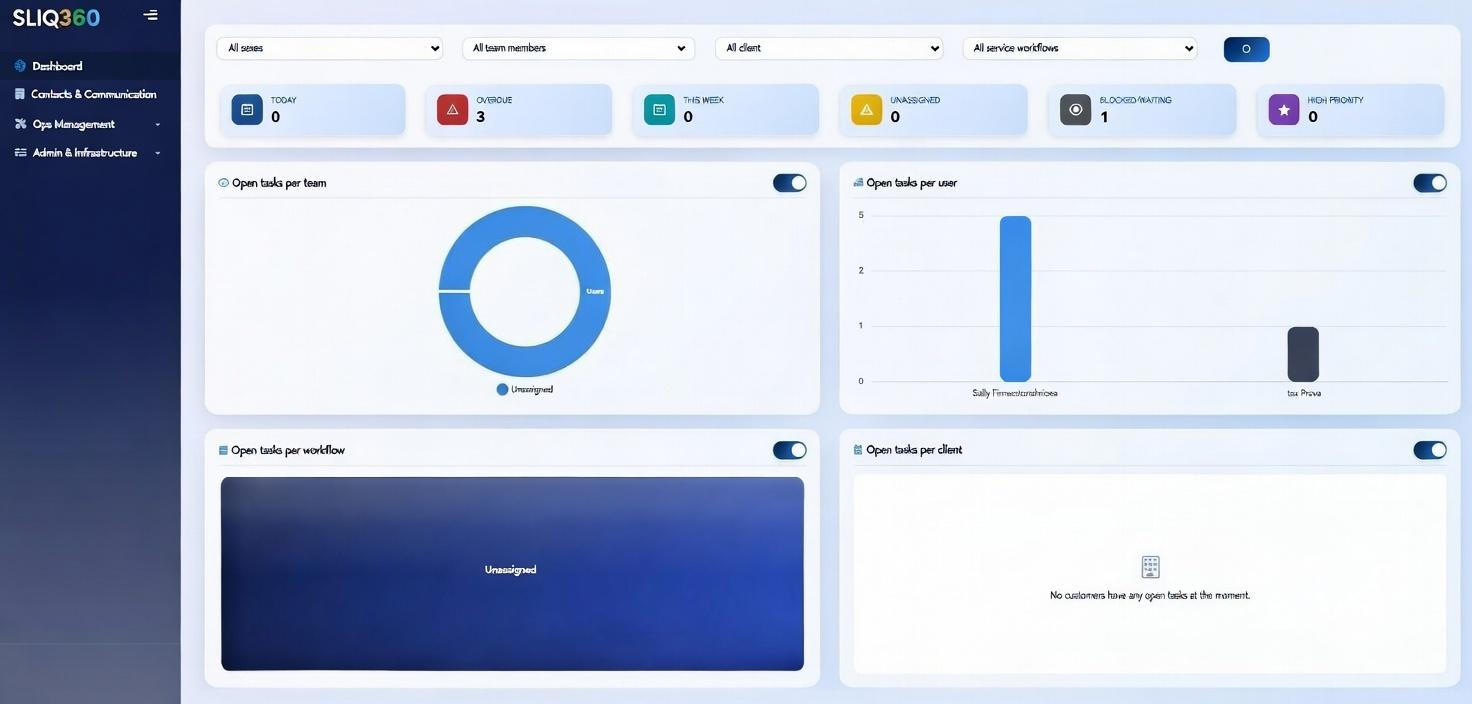
At Sliq360, we built our client portal specifically to solve the document chase problem for small accounting firms.
Here’s what makes it different:
- Client-friendly upload interface. Your clients don’t need technical skills. They click a link, see what you need, and upload documents directly from their phone or computer.
- Smart automated reminders. Set your frequency once, and the system handles the rest. Clients get polite nudges until they complete their checklist.
- Real-time visibility. Your dashboard shows exactly who’s sent what, who’s overdue, and who’s complete — no spreadsheet required.
- Secure and organised. All files are encrypted, organised by client and request, and instantly accessible to your team.
- Built into your workflow. Document requests integrate directly with your practice management workflow, so you’re not juggling another separate tool.
The result? You stop chasing. Clients respond faster. And you get back hours every week to focus on the work that actually matters.
Stop chasing clients for documents, for good
You became an accountant to help clients make better financial decisions, grow their businesses, and achieve their goals. Not to spend hours every week chasing clients for documents.
The document chase isn’t a personality problem with your clients. It’s a system problem, and system problems have system solutions.
When you move from manual email requests to automated document collection, you don’t just save time. You change the entire dynamic of the client relationship. Instead of you constantly reminding them, the system handles accountability. Instead of chasing, you’re responding to completed requests.
And here’s what happens next: your clients start to see you as organised, professional, and efficient. Because you are. You’ve just given yourself the tools to prove it.
Ready to stop chasing clients for documents?
See how Sliq360’s automated client portal can cut your document collection time in half – no more follow-ups, no more chasing.
Book a demo of Sliq360 today and get back to doing the work you actually trained for.
Frequently Asked Questions
Research shows accountants spend nearly 5 hours per week dealing with client data issues. For a practice with 100 clients, just 5 minutes per client equals over 8 hours of non-billable overhead per document request cycle. Across monthly, quarterly, and annual requests, this adds up to hundreds of lost billable hours annually.
Clients aren’t trying to make your life difficult; they’re busy running their businesses. Email requests get buried, they forget what you need, or they’re unclear about deadlines. The problem isn’t client motivation; it’s the lack of a clear, automated system that reminds them and makes uploading easy.
Actually, the opposite is true. Clients appreciate professional, consistent reminders that keep them on track. What they find annoying is last-minute panic calls or being blamed for missing deadlines they didn’t know about. Automated reminders set clear expectations and help clients stay organised.
Email creates scattered communication: threads get lost, you can’t see who’s sent what, and follow-ups are manual. A client portal provides a centralised checklist, automatic reminders, organised document storage, and real-time visibility into outstanding items, eliminating back-and-forth.
Modern client portals are designed for simplicity. Clients click a link, see a clear list of what you need, and upload files directly from their phone or computer – no special software or training required. If they can send an email attachment, they can use a client portal.
Yes. Practice management systems like Sliq360 let you create templates for recurring requests (monthly bookkeeping, annual tax documents) and customise them per client. You can add or remove items, adjust deadlines, and set reminder frequencies based on each client’s needs.
Costs vary by provider, but consider this: if you’re currently spending 10 hours per week chasing documents at a billing rate of £100/hour, that’s £52,000 in lost billable time annually. Even a few thousand pounds for software pays for itself within weeks when you redirect that time to client work.
Absolutely. Small firms (1-20 people) actually benefit most from document automation because every hour matters. You’re not just saving time; you’re creating a professional client experience that helps you compete with larger firms while maintaining work-life balance.